{"name":"napari-chatgpt","display_name":"napari-chatgpt | Omega","visibility":"public","icon":"","categories":["Image Processing","Segmentation","Visualization","Utilities"],"schema_version":"0.2.1","on_activate":null,"on_deactivate":null,"contributions":{"commands":[{"id":"napari-chatgpt.start_omega","title":"Start Omega","python_name":"napari_chatgpt._widget:OmegaQWidget","short_title":null,"category":null,"icon":null,"enablement":null},{"id":"napari-chatgpt.sample_data","title":"Human Mitosis (Omega sample)","python_name":"napari_chatgpt._sample_data:make_sample_data","short_title":null,"category":null,"icon":null,"enablement":null}],"readers":null,"writers":null,"widgets":[{"command":"napari-chatgpt.start_omega","display_name":"Omega -- an AI agent for image processing and analysis","autogenerate":false}],"sample_data":[{"command":"napari-chatgpt.sample_data","key":"omega-sample","display_name":"Human Mitosis (Omega sample)"}],"themes":null,"menus":{},"submenus":null,"keybindings":null,"configuration":[]},"package_metadata":{"metadata_version":"2.4","name":"napari-chatgpt","version":"2026.2.9","dynamic":null,"platform":null,"supported_platform":null,"summary":"Omega: an autonomous LLM-powered agent for conversational image processing and analysis in napari. Supports OpenAI, Anthropic, and Google Gemini.","description":"## Home of _Omega_, a napari-aware autonomous LLM-based agent specialized in image processing and analysis.\n\n[](https://github.com/royerlab/napari-chatgpt/raw/main/LICENSE)\n[](https://pypi.org/project/napari-chatgpt)\n[](https://python.org)\n[](https://pepy.tech/project/napari-chatgpt)\n[](https://pepy.tech/project/napari-chatgpt)\n[](https://napari-hub.org/plugins/napari-chatgpt)\n[](https://doi.org/10.1038/s41592-024-02310-w)\n[](https://doi.org/10.5281/zenodo.10828225)\n[](https://github.com/royerlab/napari-chatgpt/)\n[](https://github.com/royerlab/napari-chatgpt/)\n\n \n
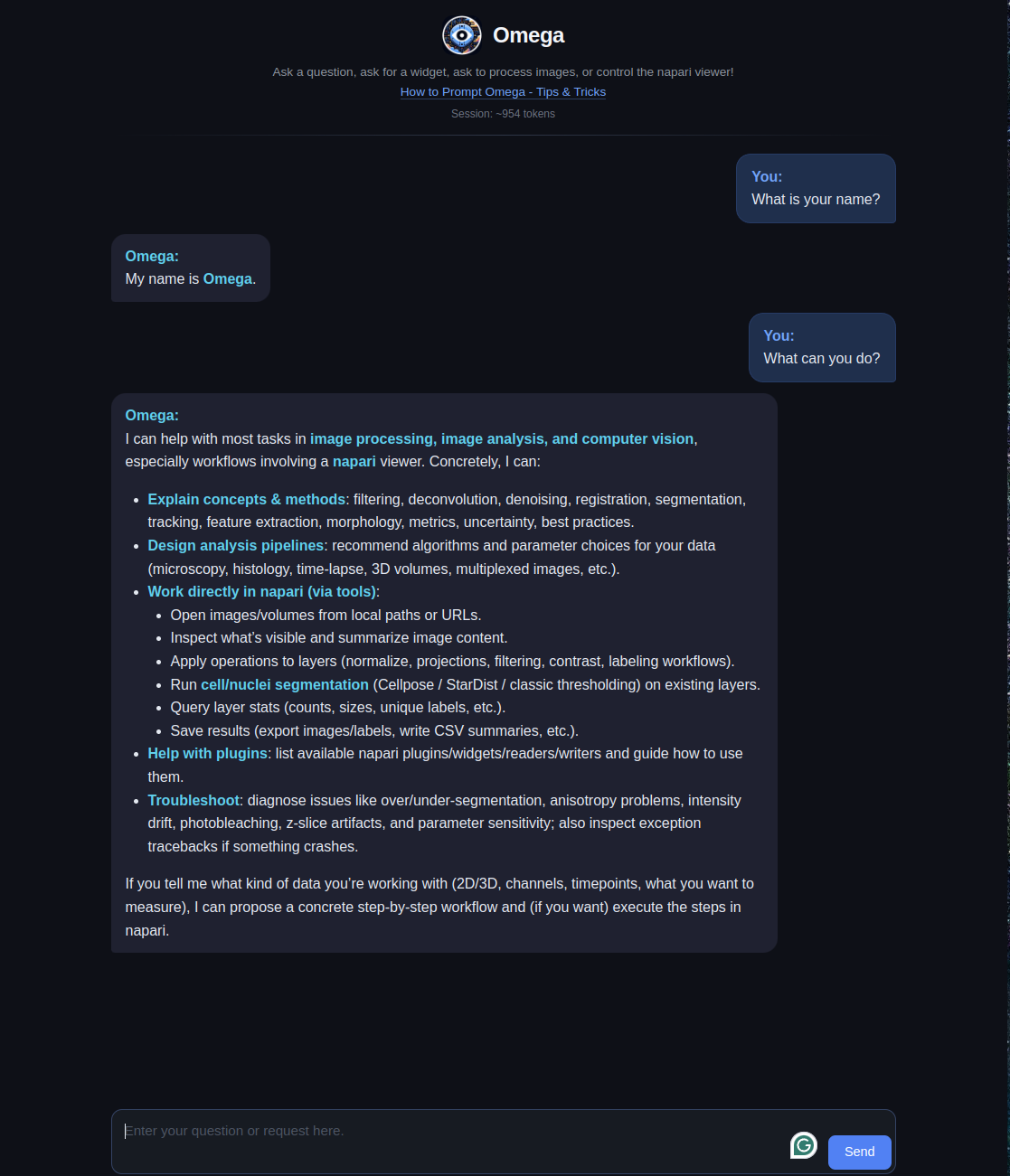
\n \n\n\nA [napari](https://napari.org) plugin that leverages Large Language Models\nto implement _Omega_, a napari-aware agent capable of performing image processing and analysis tasks\nin a conversational manner.\n\nThis repository started as a 'week-end project'\nby [Loic A. Royer](https://twitter.com/loicaroyer)\nwho leads a [research group](https://royerlab.org) at\nthe [Chan Zuckerberg Biohub](https://royerlab.org). It\nuses [LiteMind](https://github.com/royerlab/litemind), an LLM abstraction library\nsupporting multiple providers including [OpenAI](https://openai.com),\n[Anthropic](https://anthropic.com) (Claude), and [Google Gemini](https://deepmind.google/technologies/gemini/),\nas well as [napari](https://napari.org), a fast, interactive,\nmulti-dimensional image viewer for Python,\n[another](https://ilovesymposia.com/2019/10/24/introducing-napari-a-fast-n-dimensional-image-viewer-in-python/)\nweek-end project, initially started by Loic and [Juan Nunez-Iglesias](https://github.com/jni).\n\n# What is Omega?\n\nOmega is an LLM-based and tool-armed autonomous agent that demonstrates the\npotential for Large Language Models (LLMs) to be applied to image processing,\nanalysis and visualization.\nCan LLM-based agents write image processing code and napari widgets, correct its\ncoding mistakes, perform follow-up analysis, and control the napari viewer?\nThe answer appears to be yes.\n\nThe publication is available here: [10.1038/s41592-024-02310-w](https://doi.org/10.1038/s41592-024-02310-w).\nThe preprint can be downloaded here: [10.5281/zenodo.10828225](https://doi.org/10.5281/zenodo.10828225).\n\n#### In this video, I ask Omega to segment an image using the [SLIC](https://www.iro.umontreal.ca/~mignotte/IFT6150/Articles/SLIC_Superpixels.pdf) algorithm. It makes a first attempt using the implementation in scikit-image but fails because of an inexistent 'multichannel' parameter. Realizing that, Omega tries again, and this time succeeds:\n\nhttps://user-images.githubusercontent.com/1870994/235768559-ca8bfa84-21f5-47b6-b2bd-7fcc07cedd92.mp4\n\n#### After loading a sample 3D image of cell nuclei in napari, I asked Omega to segment the nuclei using the Otsu method. My first request was vague, so it just segmented foreground versus background. I then ask to segment the foreground into distinct segments for each connected component. Omega does a rookie mistake by forgetting to 'import np'. No problem; it notices, tries again, and succeeds:\n\nhttps://user-images.githubusercontent.com/1870994/235769990-a281a118-1369-47aa-834a-b491f706bd48.mp4\n\n#### In this video, one of my favorites, I ask Omega to make a 'Max color projection widget.' It is not a trivial task, but it manages!\n\nhttps://github.com/royerlab/napari-chatgpt/assets/1870994/bb9b35a4-d0aa-4f82-9e7c-696ef5859a2f\n\nAs LLMs improve, Omega will become even more adept at handling complex\nimage processing and analysis tasks. Through the [LiteMind](https://github.com/royerlab/litemind) library,\nOmega supports multiple LLM providers including OpenAI (GPT-5, GPT-4o), Anthropic (Claude Opus, Sonnet, Haiku),\nand Google Gemini (Gemini 3, Gemini 2.5 Pro/Flash). Many of the videos (see below and here) are highly reproducible,\nwith a typically 90% success rate (see preprint for a reproducibility analysis).\n\nOmega could eventually help non-experts process and analyze images, especially\nin the bioimage domain.\nIt is also potentially valuable for educative purposes as it could\nassist in teaching image processing and analysis, making it more accessible.\nAlthough the LLMs powering Omega may not yet be on par with an expert image\nanalyst or computer vision expert, it is just a matter of time...\n\nOmega holds a conversation with the user and uses different tools to answer questions,\ndownload and operate on images, write widgets for napari, and more.\n\n
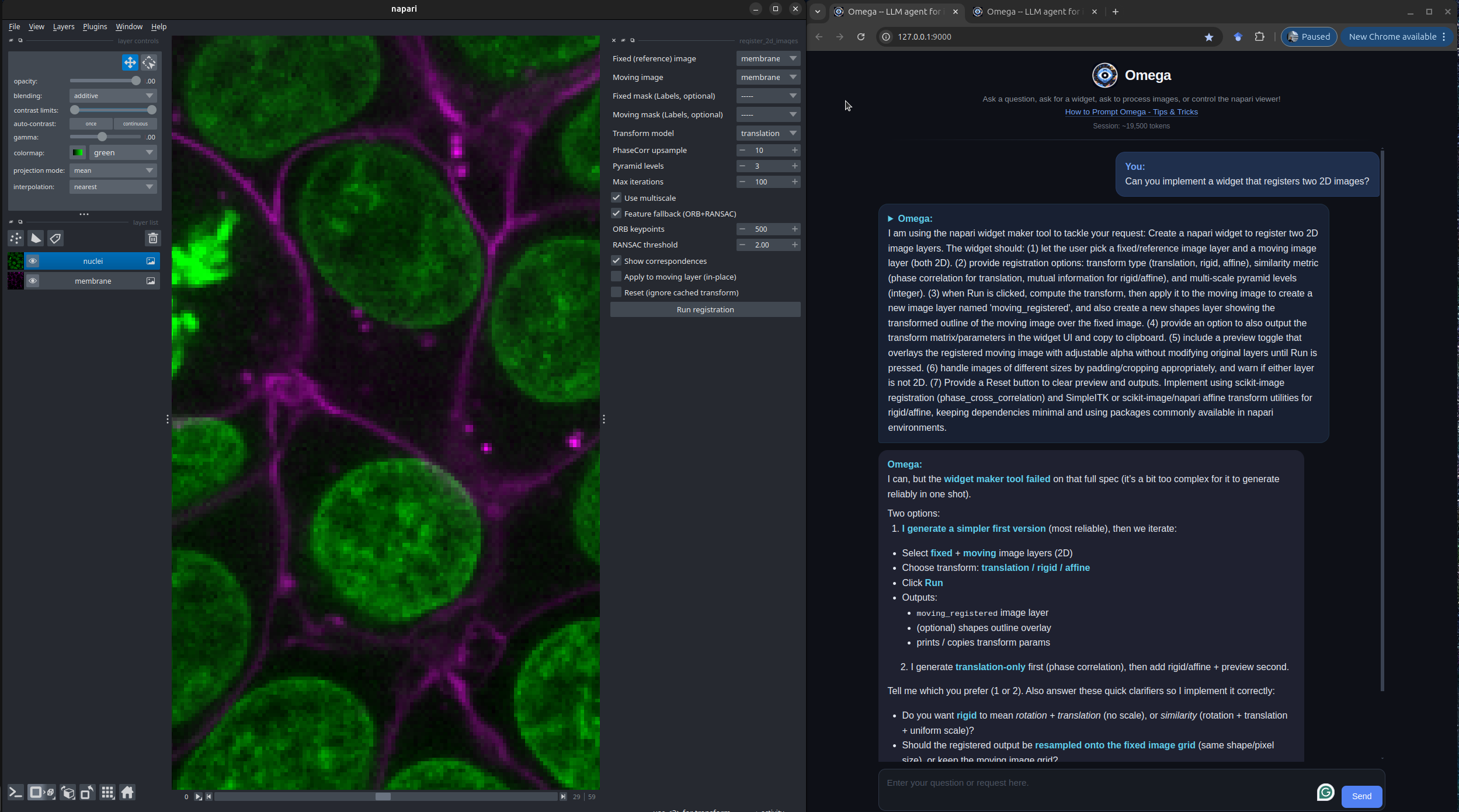
 \n\n## Omega's Tools\n\nOmega comes with a comprehensive set of built-in tools:\n\n- **Viewer Control** -- manipulate the napari viewer (camera, layers, rendering)\n- **Widget Creation** -- generate custom napari widgets from natural language\n- **Image Segmentation** -- classic (Otsu/watershed), Cellpose, and StarDist segmentation\n- **Image Denoising** -- AI-powered denoising via Aydin\n- **Viewer Vision** -- screenshot-based visual analysis of the viewer contents\n- **napari Plugin Integration** -- discover and use any installed napari plugin (readers, writers, widgets)\n- **File Download** -- download files from URLs for subsequent processing\n- **Python Functions Info** -- query signatures and docstrings of any Python function\n- **Package Info** -- search installed Python packages\n- **Pip Install** -- install Python packages (with user permission)\n- **Exception Catcher** -- catch and report uncaught exceptions for debugging\n- **Web Search** -- search the web, Wikipedia, and find images\n- **Python REPL** -- execute arbitrary Python code\n\nHere is an example of Omega creating a custom image registration widget in napari:\n\n
 \n\n## Omega's Built-in AI-Augmented Code Editor\n\nThe Omega AI-Augmented Code Editor is a new feature within Omega, designed to enhance the Omega's user experience. This\neditor is not just a text editor; it's a powerful interface that interacts with the Omega dialogue agent to generate,\noptimize, and manage code for advanced image analysis tasks.\n\n
 \n\n#### Key Features\n\n- **Code Highlighting and Completion**: For ease of reading and writing, the code editor comes with built-in syntax\n highlighting and intelligent code completion features.\n- **LLM-Augmented Tools**: The editor is equipped with AI tools that assist in commenting, cleaning up, fixing,\n modifying, and performing safety checks on the code.\n- **Persistent Code Snippets**: Users can save and manage snippets of code, preserving their work across multiple Napari\n sessions.\n- **Network Code Sharing (Code-Drop)**: Facilitates the sharing of code snippets across the local network, empowering\n collaborative work and knowledge sharing.\n\n#### Usage Scenarios\n\n- **Widget Creation**: Expert users can create widgets using the Omega dialogue agent and retain them for future use.\n- **Collaboration**: Share custom widgets with colleagues or the community, even if they don't have access to an API\n key.\n- **Learning**: New users can learn from the AI-augmented suggestions, improving their coding skills in Python and image\n analysis workflows.\n\nYou can find more information in the\ncorresponding [wiki page](https://github.com/royerlab/napari-chatgpt/wiki/OmegaCodeEditor).\n\n----------------------------------\n\n## Omega's Installation instructions:\n\nAssuming you have a Python environment with a working napari installation, you can simply:\n\n pip install napari-chatgpt\n\nOr install the plugin from napari's plugin installer.\n\nFor detailed instructions and variations, check [this page](http://github.com/royerlab/napari-chatgpt/wiki/InstallOmega)\nof our wiki.\n\n### Key Dependencies\n\n- **[LiteMind](https://github.com/royerlab/litemind)** -- LLM abstraction (OpenAI, Anthropic, Gemini)\n- **[napari](https://napari.org)** >= 0.5\n- **FastAPI/Uvicorn** -- WebSocket chat server\n- **scikit-image** -- image processing\n- **beautifulsoup4** -- web scraping\n- **requests** -- HTTP downloads\n- **Python 3.10+** supported\n\n## Requirements:\n\nYou need an API key from at least one supported LLM provider:\n- **OpenAI** - Get your key at [platform.openai.com](https://platform.openai.com)\n- **Anthropic (Claude)** - Get your key at [console.anthropic.com](https://console.anthropic.com)\n- **Google Gemini** - Get your key at [aistudio.google.com](https://aistudio.google.com)\n- **GitHub Models** - Auto-detected if `GITHUB_TOKEN` is set\n- **Custom endpoints** - Any OpenAI-compatible API (local LLMs, Azure, etc.)\n\nCheck [here](https://github.com/royerlab/napari-chatgpt/wiki/APIKeys) for details on API key setup.\nOmega will automatically detect which providers you have configured.\n\n### GitHub Models (free)\n\nIf you have a [GitHub personal access token](https://github.com/settings/tokens), Omega can use\nmodels from the [GitHub Models marketplace](https://github.com/marketplace/models) (GPT-4o, Llama,\nPhi, Mistral, and more) for free with rate limits. Just set the `GITHUB_TOKEN` environment variable:\n\n```bash\nexport GITHUB_TOKEN=\"ghp_your_token_here\"\n```\n\nOmega auto-detects this token on startup and registers all available GitHub Models.\n\n### Custom OpenAI-compatible endpoints\n\nYou can connect Omega to any OpenAI-compatible API (Azure OpenAI, local LLMs via Ollama/vLLM, or\nthird-party providers) by adding entries to `~/.omega/config.yaml`:\n\n```yaml\ncustom_endpoints:\n - name: \"Azure GPT-4\"\n base_url: \"https://my-resource.openai.azure.com/openai/deployments/gpt-4/v1\"\n api_key_env: \"AZURE_OPENAI_API_KEY\"\n - name: \"Local Ollama\"\n base_url: \"http://localhost:11434/v1\"\n api_key_env: \"OLLAMA_API_KEY\"\n```\n\nEach endpoint requires a `base_url` and an `api_key_env` (the name of the environment variable\nholding the API key). Models discovered from these endpoints appear in the model dropdown alongside\nbuilt-in providers.\n\n### Extending Omega with custom tools\n\nExternal packages can register new tools for Omega via Python entry points. Create a class that\nsubclasses `BaseOmegaTool` and declare it in your `pyproject.toml`:\n\n```toml\n[project.entry-points.\"napari_chatgpt.tools\"]\nmy_tool = \"my_package.tools:MyCustomTool\"\n```\n\nOmega discovers and loads these tools automatically on startup. See the\n[Extensibility wiki page](https://github.com/royerlab/napari-chatgpt/wiki/Extensibility) for full\ndetails and examples.\n\n## Usage:\n\nCheck this [page](https://github.com/royerlab/napari-chatgpt/wiki/HowToStartOmega) of\nour [wiki](https://github.com/royerlab/napari-chatgpt/wiki) for details on how to start Omega.\n\n## Tips, Tricks, and Example prompts:\n\nCheck our guide on how to prompt Omega and some\nexamples [here](https://github.com/royerlab/napari-chatgpt/wiki/Tips&Tricks).\n\n## Video Demos:\n\nYou can check the original release videos [here](https://github.com/royerlab/napari-chatgpt/wiki/VideoDemos).\nYou can also find the latest preprint videos on [Vimeo](https://vimeo.com/showcase/10983382).\n\n## How does Omega work?\n\nThe publication is available here: [10.1038/s41592-024-02310-w](https://doi.org/10.1038/s41592-024-02310-w).\nCheck our preprint here: [10.5281/zenodo.10828225](https://doi.org/10.5281/zenodo.10828225).\n\nand our [wiki page](https://github.com/royerlab/napari-chatgpt/wiki/OmegaDesign) on Omega's design and architecture.\n\n## Cost:\n\nLLM API costs vary by provider and model. For reference:\n- **OpenAI** pricing: [openai.com/pricing](https://openai.com/pricing)\n- **Anthropic** pricing: [anthropic.com/pricing](https://anthropic.com/pricing)\n- **Google Gemini** pricing: [ai.google.dev/pricing](https://ai.google.dev/pricing)\n\nMost providers allow you to set spending limits to control costs.\n\n## Disclaimer:\n\nDo not use this software lightly; it will download libraries of its own volition\nand write any code it deems necessary; it might do what you ask, even\nif it is a very bad idea. Also, beware that it might _misunderstand_ what you ask and\nthen do something bad in ways that elude you. For example, it is unwise to use Omega to delete\n'some' files from your system; it might end up deleting more than that if you are unclear in\nyour request. \nOmega is generally safe as long as you do not make dangerous requests. To be 100% safe, and\nif your experiments with Omega could be potentially problematic, I recommend using this\nsoftware from within a sandboxed virtual machine.\nAPI keys are only as safe as the overall machine is, see the section below on API key hygiene.\n\nTHE SOFTWARE IS PROVIDED “AS IS”, WITHOUT WARRANTY OF ANY KIND, EXPRESS OR\nIMPLIED, INCLUDING BUT NOT LIMITED TO THE WARRANTIES OF MERCHANTABILITY, FITNESS FOR A\nPARTICULAR PURPOSE AND NONINFRINGEMENT. IN NO EVENT SHALL THE AUTHORS OR COPYRIGHT HOLDERS\nBE LIABLE FOR ANY CLAIM, DAMAGES OR OTHER LIABILITY, WHETHER IN AN ACTION OF CONTRACT,\nTORT OR OTHERWISE, ARISING FROM, OUT OF OR IN CONNECTION WITH THE SOFTWARE OR\nTHE USE OR OTHER DEALINGS IN THE SOFTWARE.\n\n## API key hygiene:\n\nBest Practices for Managing Your API Keys:\n\n- **Host Computer Hygiene:** Ensure that the machine you're installing napari-chatgpt/Omega on is secure, free of malware\n and viruses, and otherwise not compromised. Make sure to install antivirus software on Windows.\n- **Security:** Treat your API key like a password. Do not share it with others or expose it in public repositories or\n forums.\n- **Cost Control:** Set spending limits on your LLM provider account:\n [OpenAI](https://platform.openai.com/account/limits) |\n [Anthropic](https://console.anthropic.com/settings/limits) |\n [Google Gemini](https://console.cloud.google.com/billing)\n- **Regenerate Keys:** If you believe your API key has been compromised, revoke and regenerate it from your provider's\n console immediately:\n [OpenAI](https://platform.openai.com/api-keys) |\n [Anthropic](https://console.anthropic.com/settings/keys) |\n [Google Gemini](https://aistudio.google.com/apikey)\n- **Key Storage:** Omega has a built-in 'API Key Vault' that encrypts keys using a password, this is the preferred\n approach. You can also store the key in an environment variable, but that is not encrypted and could compromise the\n key.\n\n## Contributing\n\nContributions are extremely welcome. The project uses a Makefile for development:\n\n```bash\nmake setup # Install with dev dependencies + pre-commit hooks\nmake test # Run all tests\nmake test-cov # Run tests with coverage\nmake format # Format code with black and isort\nmake check # Run all code checks\n```\n\nPlease ensure the coverage stays the same before you submit a pull request.\n\n## License\n\nDistributed under the terms of the [BSD-3] license,\n\"napari-chatgpt\" is free and open-source software\n\n## Issues\n\nIf you encounter any problems, please [file an issue] along with a detailed\ndescription.\n\n[BSD-3]: http://opensource.org/licenses/BSD-3-Clause\n\n[file an issue]: https://github.com/royerlab/napari-chatgpt/issues\n","description_content_type":"text/markdown","keywords":"agent,chatgpt,image-processing,llm,napari,omega","home_page":null,"download_url":null,"author":null,"author_email":"\"Loic A. Royer\" ","maintainer":null,"maintainer_email":null,"license":null,"classifier":["Development Status :: 4 - Beta","Framework :: napari","Intended Audience :: Education","Intended Audience :: Science/Research","License :: OSI Approved :: BSD License","Operating System :: MacOS","Operating System :: Microsoft :: Windows","Operating System :: OS Independent","Operating System :: POSIX :: Linux","Programming Language :: Python","Programming Language :: Python :: 3","Programming Language :: Python :: 3 :: Only","Programming Language :: Python :: 3.10","Programming Language :: Python :: 3.11","Programming Language :: Python :: 3.12","Programming Language :: Python :: 3.13","Topic :: Scientific/Engineering","Topic :: Scientific/Engineering :: Artificial Intelligence","Topic :: Scientific/Engineering :: Bio-Informatics","Topic :: Scientific/Engineering :: Image Processing","Topic :: Scientific/Engineering :: Visualization"],"requires_dist":["arbol","beautifulsoup4>=4.12","black>=23.0","cryptography>=43.0","duckduckgo-search>=7.0.0","fastapi>=0.109","httpx>=0.24","imageio[ffmpeg,pyav]>=2.31","jedi>=0.18","litemind>=2026.2.1","lxml-html-clean","lxml>=4.9","magicgui>=0.7","matplotlib>=3.7","napari>=0.5","nbformat>=5.7","numba>=0.60","numpy>=1.26","ome-zarr>=0.8","qtawesome>=1.0","qtpy>=2.0","requests>=2.28","scikit-image>=0.21","tabulate>=0.9","uvicorn>=0.20","websockets>=11.0","xarray<2025,>=2024.1.0","cellpose; extra == 'testing'","napari; extra == 'testing'","npe2; extra == 'testing'","nvidia-cuda-nvcc-cu12; extra == 'testing'","pyqt5; extra == 'testing'","pytest; extra == 'testing'","pytest-cov; extra == 'testing'","pytest-mock; extra == 'testing'","pytest-qt; extra == 'testing'","pytest-xvfb; extra == 'testing'","stardist; extra == 'testing'","tensorflow; extra == 'testing'","tox; extra == 'testing'"],"requires_python":">=3.10","requires_external":null,"project_url":["Homepage, https://github.com/royerlab/napari-chatgpt","Bug Tracker, https://github.com/royerlab/napari-chatgpt/issues","Documentation, https://github.com/royerlab/napari-chatgpt/wiki","Source Code, https://github.com/royerlab/napari-chatgpt"],"provides_extra":["testing"],"provides_dist":null,"obsoletes_dist":null},"npe1_shim":false}