{"name":"AlveolEye","display_name":"AlveolEye","visibility":"public","icon":"","categories":[],"schema_version":"0.2.1","on_activate":null,"on_deactivate":null,"contributions":{"commands":[{"id":"AlveolEye.get_reader","title":"Open data with AlveolEye","python_name":"alveoleye._reader:napari_get_reader","short_title":null,"category":null,"icon":null,"enablement":null},{"id":"AlveolEye.write_mlultiple","title":"Save multi-layer data with AlveolEye","python_name":"alveoleye._writer:write_multiple","short_title":null,"category":null,"icon":null,"enablement":null},{"id":"AlveolEye.write_single_image","title":"Save image data with AlveolEye","python_name":"alveoleye._writer:write_single_image","short_title":null,"category":null,"icon":null,"enablement":null},{"id":"AlveolEye.make_sample_data","title":"Load sample data from AlveolEye","python_name":"alveoleye._sample_data:make_sample_data","short_title":null,"category":null,"icon":null,"enablement":null},{"id":"AlveolEye.make_qwidget","title":"Make example QWidget","python_name":"alveoleye._widget:WidgetMain","short_title":null,"category":null,"icon":null,"enablement":null}],"readers":[{"command":"AlveolEye.get_reader","filename_patterns":[".jpeg",".jpg",".png",".tif",".tiff"],"accepts_directories":false}],"writers":[{"command":"AlveolEye.write_multiple","layer_types":["image*","labels*"],"filename_extensions":[],"display_name":""},{"command":"AlveolEye.write_single_image","layer_types":["labels+"],"filename_extensions":[".npy"],"display_name":""}],"widgets":[{"command":"AlveolEye.make_qwidget","display_name":"AlveolEye","autogenerate":false}],"sample_data":[{"command":"AlveolEye.make_sample_data","key":"unique_id.1","display_name":"AlveolEye"}],"themes":null,"menus":{},"submenus":null,"keybindings":null,"configuration":[]},"package_metadata":{"metadata_version":"2.4","name":"AlveolEye","version":"0.1.7","dynamic":["license-file"],"platform":null,"supported_platform":null,"summary":"Reads lung slides with AI-driven and classical methods","description":"# AlveolEye: Automated Lung Morphometry Made Easy\n\n[](https://www.napari-hub.org/plugins/AlveolEye)\n\n\n\n\n[](https://pypi.org/project/AlveolEye/)\n\n\n\n\nThis repository contains the beta version of AlveolEye, created by the [Sucre lab](https://www.sucrelab.org/). \nThe code is authored by Samuel Hirsh, Joseph Hirsh, Nick Negretti, and Shawyon Shirazi.\n\nAlveolEye is a Napari plugin that uses computer vision and classical image processing \nto calculate mean linear intercept (MLI) and airspace volume density (ASVD) of histologic images.\n\nThe goal of this tool is to aid researchers, not provide a complete automated annotation solution.\n\nWe welcome GitHub issues and feedback!\n\n## Installation\n\nThe goal of this process is to create a conda environment containing Napari and all AlveolEye requirements.\n\n*If you already have conda set up, you can skip step 1.*\n\n1. **Install Miniconda** by downloading the appropriate version from [here](https://www.anaconda.com/docs/getting-started/miniconda/install): \n - Choose the version that matches your processor. \n - Download the `.pkg` version for easy installation.\n\n2. **Clone the repository** (by opening a terminal or Miniconda prompt and running the following)\n ```\n git clone https://github.com/SucreLab/AlveolEye\n ```\n\n3. **Navigate to the directory**:\n ```\n cd AlveolEye\n ```\n\n4. **Create the conda environment**:\n ```\n conda env create -f ./environment.yml\n ```\n\n5. **Activate the environment**:\n ```\n conda activate AlveolEye\n ```\n\n6. **Install the plugin**:\n ```\n pip install .\n ```\n\n7. **Launch Napari** and locate the plugin in the plugin menu:\n ```\n napari\n ```\n\n## Running Post-Installation\n\n1. **Activate the environment** in the terminal or Miniconda prompt:\n ```\n conda activate AlveolEye\n ```\n\n2. **Run Napari** in the terminal:\n ```\n napari\n ```\n\n\n\n## Usage\n\n### Processing: Identify and Segment Vessel Endothelium and Airway Epithelium with Computer Vision\n\n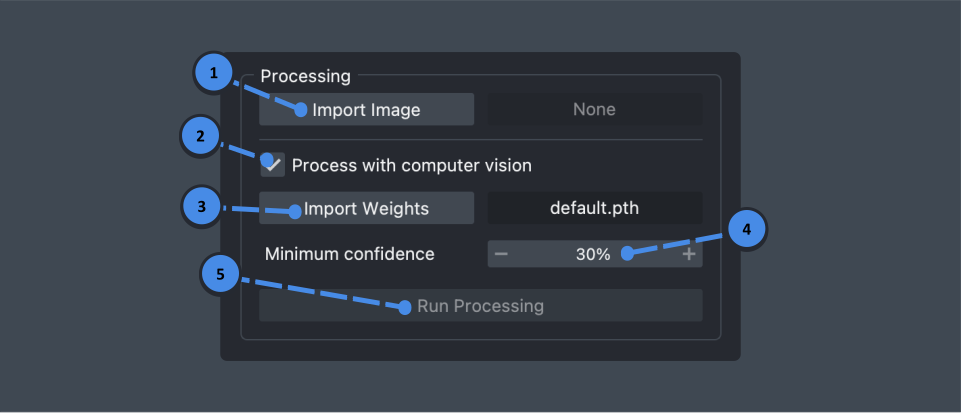\n\n1. **Import image** \n - Click the \"Import Image\" button. \n - Use the file dialog to select an image (`.jpg`, `.png`, or `.tiff`). \n - Verify that the image correctly loaded. The file name should appear to the right of the button.\n\n2. **Toggle processing with computer vision** \n - Keep the checkbox selected to process the image with computer vision (continue to step 3). \n - Deselect to skip computer vision processing (skip to step 5).\n\n3. **Import weights** \n - To use the default model, proceed to step 4. \n - To use a custom model: \n - Click the \"Import Weights\" button. \n - Select a model file (`.pth`). \n - Verify that the weights correctly loaded. The file name should appear to the right of the button.\n\n4. **Set minimum confidence** \n - Adjust the minimum confidence using the input box or the \"-/+\" buttons. \n - Predictions from the computer vision model with lower confidence than this threshold will not appear.\n\n5. **Run processing** \n - Click the \"Run Processing\" button. \n - Once completed, manually edit the prediction as needed using Napari's built-in tools.\n\n\n\n### Postprocessing: Segment Alveolar Tissue and Find Vessel and Aireway Lumens\n\n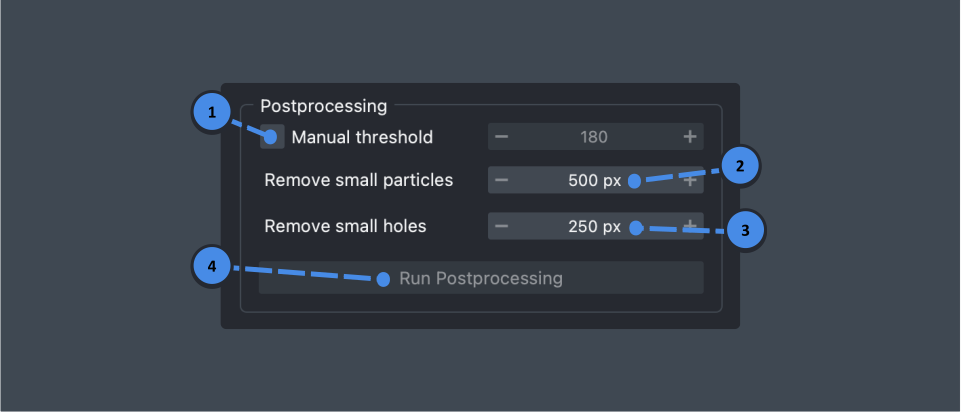\n\n1. **Configure thresholding** \n - For manual thresholding: Select the \"Manual threshold\" checkbox and use the spinbox to set the threshold level. \n - For automatic thresholding ([Otsu's method](https://learnopencv.com/otsu-thresholding-with-opencv/)): Leave the box unchecked.\n\n2. **Remove small particles** \n - Set the minimum size cutoff.\n - Particles with fewer pixels than this value will be removed.\n\n3. **Remove small holes** \n - Set the minimum size cutoff. \n - Holes with fewer pixels than this value will be removed.\n\n4. **Run postprocessing** \n - Click the \"Run Postprocessing\" button. \n - Once completed, manually edit the results as needed using Napari's built-in tools.\n\n\n\n### Assessments: Calculate Morphometry Measurements\n\n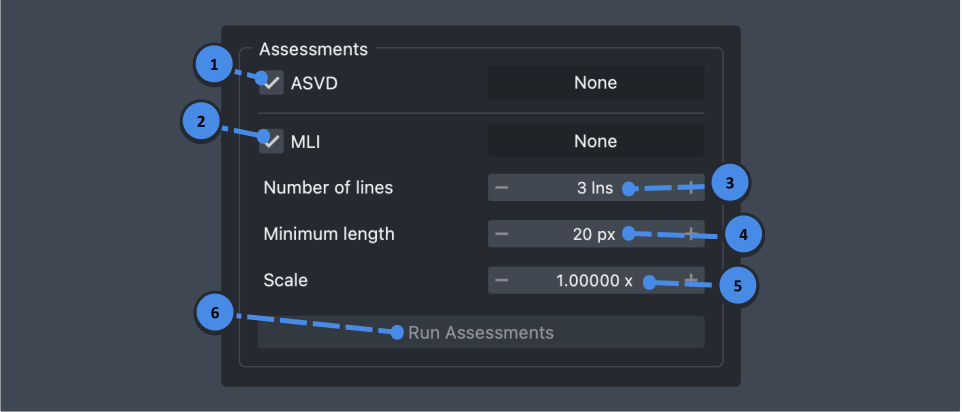\n\n1. **Airspace Volume Density (ASVD)**\n - Select the checkbox to run ASVD calculation.\n - Deselect the checkbox to exclude data from export and increase processing speed.\n\n2. **Mean Linear Intercept (MLI)**\n - Select the checkbox to run MLI calculation.\n - Deselect the checkbox to exclude data from export and increase processing speed.\n\n3. **Number of lines**\n - Set the number of lines used for MLI calculation.\n\n5. **Minimum length**\n - Set the minimum chord length for inclusion in MLI calculations.\n - Note: Chords are the line segments that span across an airspace between two alveolar tissue boundaries during MLI calculation.\n\n7. **Scale**\n - Set the pixel-to-physical space multiplier.\n\n9. **Run assessments**\n - Click the \"Run Assessments\" button.\n - View results displayed beside assessment checkboxes and in the export box.\n\n\n\n### Export Results: Save Assessment Results as a CSV or JSON File\n\n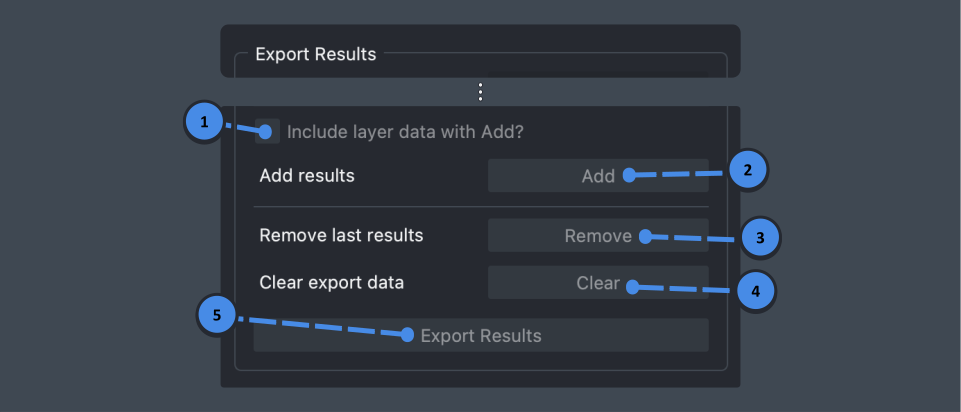\n\n1. **Add results**\n - Click \"Add\" to include current assessment data in the export file.\n\n3. **Remove last result**\n - Click \"Remove\" to delete the last added results from the export file.\n\n5. **Clear export data**\n - Click \"Clear\" to empty the export file.\n\n7. **Export results**\n - Click \"Export Results\" to save the data (`.csv` or `.json` format).\n\n**Results Key**\n\n- **MLI**: Mean Linear Intercept for the tissue image\n \n- **Standard deviation**: Standard deviation of chord lengths used in MLI calculation\n \n- **Number of chords**: Number of chords used in MLI calculation\n\n- **ASVD**: Airspace Volume Density for the image\n \n- **Airspace pixels**: Total number of airspace pixels\n \n- **Non-airspace pixels**: Total number of non-airspace pixels\n\n\n\n## Manual Annotation Guide\n\n### Label Reference\n\n| Structure | Label Number |\n|--------------------|--------------|\n| Blocker | 1 |\n| Airway Epithelium | 2 |\n| Vessel Endothelium | 3 |\n| Airway Lumen | 4 |\n| Vessel Lumen | 5 |\n| Parenchyma | 6 |\n| Alveoli | 7 |\n\n### Annotation Tips\n\n- **Eyedropper tool**: Click the eyedropper tool, then click a pixel in the image to set your active label (for drawing and editing) to that pixel's label. \n- **Layer selection**: Ensure you're working on the correct layer before annotating. \n- **Visibility control**: Hide unnecessary layers using the eye icon on the layer boxes (to the left of the image viewer) for clearer viewing.\n- **Blocking**: Encircle airways and vessels in the blocking label, and everything within that closed shape will be discounted from assessments calculation. \n\n\n\n## Additional Information\n\n### Theme Settings\n\nToggle between dark and light mode using:\n\n- **Windows/Linux**: `Ctrl + Shift + T` \n- **macOS**: `Cmd + Shift + T`\n\nOr through Napari preferences:\n\n1. Select \"napari\" in the menu bar.\n \n2. Choose \"Preferences.\"\n \n3. Click \"Appearance\" in the left menu.\n \n4. Select \"dark,\" \"light,\" or \"system\" in the theme dropdown.\n\n\n","description_content_type":"text/markdown","keywords":null,"home_page":null,"download_url":null,"author":"Joseph Hirsh","author_email":"josephhirsh9@gmail.com","maintainer":null,"maintainer_email":null,"license":"BSD","classifier":["Development Status :: 2 - Pre-Alpha","Framework :: napari","Intended Audience :: Developers","License :: OSI Approved :: BSD License","Operating System :: OS Independent","Programming Language :: Python","Programming Language :: Python :: 3","Programming Language :: Python :: 3 :: Only","Programming Language :: Python :: 3.8","Programming Language :: Python :: 3.9","Programming Language :: Python :: 3.10","Topic :: Scientific/Engineering :: Image Processing"],"requires_dist":["numpy","magicgui","qtpy","typeguard","pytest; extra == \"testing\"","pytest-cov; extra == \"testing\"","pytest-qt; extra == \"testing\"","napari; extra == \"testing\"","qtpy; extra == \"testing\""],"requires_python":">=3.8","requires_external":null,"project_url":null,"provides_extra":["testing"],"provides_dist":null,"obsoletes_dist":null},"npe1_shim":false}